How to Make a Tiny Desk AI Video
Start with one portrait and leave the performance to us. This guide walks you from choosing a good photo to saving your finished Tiny Desk AI video.
How to Do the Tiny Desk AI Trend
The Tiny Desk AI trend puts a familiar face in a small band performance. To try it here, bring one portrait; the scene and generated music are prepared for you. If you came looking for the Outstanding version, watch our example first. Our version has its own music and staging, without the original recording or exact choreography.
From One Photo to a Performance
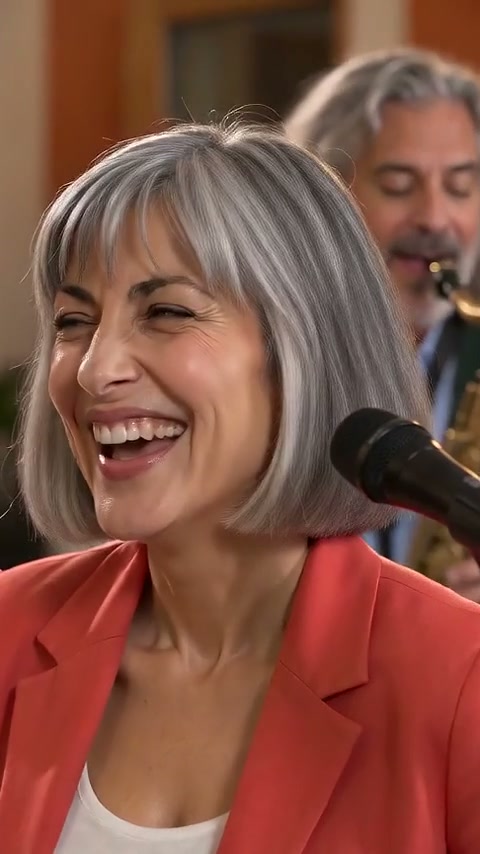
This fictional adult portrait is the actual input for the example. The frame beside it comes from the finished video. A simple, well-lit face becomes the lead singer; the band, room, expression and movement are generated.

Choose a Photo for Your Tiny Desk AI Video
Start with one adult portrait that makes the face easy to see. The photo is a character reference for a new AI performance; the expression and movement will vary.
Use a JPG, PNG or WebP file up to 10 MB, at least 301 pixels wide and tall. A front-facing portrait or square crop keeps the face easy to check.
- One person, looking toward the camera.
- A sharp photo with soft, even light.
- Eyes and face visible, without sunglasses.
- A simple portrait works better than a group shot.
If Your Tiny Desk AI Photo Will Not Upload
- Unsupported file format
- For an HEIC or another unsupported format, export a new copy as JPG, PNG or WebP. Changing the filename extension does not convert the image.
- Photo too large or an awkward crop
- Export below 10 MB and keep both sides at least 301 pixels. If the crop is extremely tall or wide, try a portrait or square crop.
- The photo cannot be opened
- Re-export the original image, then upload the new copy. For a blurry or tiny face, choose a clearer original instead of enlarging a thumbnail.
- More than one person
- Crop to one adult who has agreed to appear. Keep their whole face visible and check that the crop still meets the size requirements. Other band members are generated.
Do You Need a Tiny Desk AI Prompt?
You do not need to paste a prompt here. Upload your portrait; the performance setup is already prepared. This generator has no custom prompt field, so use the public example to decide whether the desk-band style suits your idea.
Make Your Tiny Desk AI Video, Step by Step
1. Meet the band
Play the example with sound to get a feel for the desk-band scene and generated music. The portrait beside it is the input used for that performance.
Your video will be a new AI performance, with its own expressions and movement. The example gives you a useful starting point for what to expect.
2. Choose your portrait and confirm permission
Use Upload your photo in the Lead singer photo field and check the preview. If the face is small, blurred or covered, choose a clearer image before continuing.
Sign in when prompted and confirm that you have permission to use the portrait. Check the selected image again after returning to the form.
3. Start your performance
The generator shows the video credits needed. If you need a credit, open Pricing for the current one-time price, then return to your photo.
Once you start, follow the same task in My videos. You can return there while it is processing; there is no need to submit the photo again.
4. Find the result in My Videos
Open My Videos in the same account to check the task. When it is complete, play the video and review the face, movement, ending and audio.
If generation fails, your credit returns to your account. Need a hand? Contact Support with the task ID and we can look up your video.
5. Download and review before sharing
Use the completed task’s download action to save the video. Play the saved file to check that it opens and includes the full result.
Share it as an AI-generated performance. If you add music, captions or other material in an editor, use material you have permission to use.
Tiny Desk AI Tutorial Questions
- How do I do the Outstanding Tiny Desk AI trend?
- You can make your own take on the desk-band trend here: one portrait becomes an original performance with generated music. The sample shows our style. The original Outstanding recording and exact concert choreography are not included.
- Can I make a Tiny Desk AI video for free?
- Making a video is paid. Buy a video credit with a one-time purchase, with no subscription. Check Pricing for the current price and availability.
- Will the face and performance match the photo exactly?
- AI generation can change expressions, facial details and movement. Choose a clear portrait and review the finished video before sharing it.
- What should I do if a video is still processing?
- Check the task in My Videos before submitting again. If you need help, include the task ID and the status you see when contacting support.
For price and availability, check Tiny Desk AI pricing. For help with a task, contact support.
Ready to Choose Your Photo?
Ready for your turn at the mic? Choose a portrait and make your own desk-side performance.
Open the Tiny Desk AI Generator